Case Study
Rebuilding Delta Peripherals on Odoo, from the shop window to the stockroom
How we redesigned a Chennai IT hardware retailer's Odoo store, cleaned up 2,123 products, fixed its website prices, and moved it all onto the live shop in 22 checked batches.
Delta Peripherals is a long-running Chennai seller of computer hardware: processors, graphics cards, storage, networking gear, monitors and printers. Its online shop, deltapage.com, runs on Odoo. This year we rebuilt that shop end to end: a new storefront, a cleaned-up catalogue of more than two thousand products, website prices that match what the business actually charges, a few internal tools for the team, and a carefully staged move of all of it onto the live site. Delta is also the first business running CalanaiConnect, our WhatsApp system, so we connected the two.
This is the long version. The short version is the table below.
At a glance
| What we did | What it came to |
|---|---|
| A new storefront | Redesigned homepage, navigation, filters, product pages and mobile shopping |
| Supplier data pipeline | 239 of 239 MSI product pages pulled in; 303 products checked with no missing specs |
| Catalogue clean-up | 2,123 products reviewed across 40 categories; 1,185 now fully enriched |
| Price fix | 13 old pricing rules corrected; a ₹1,800 product had been showing at ₹2,325 |
| Move to the live shop | 8,566 catalogue changes in 22 checked batches |
| WhatsApp connection | Invoices, order and delivery updates flowing from Odoo to CalanaiConnect |
Where Delta started
Delta's shop was built on Odoo 17 with Theme Prime, a popular paid Odoo theme. The foundations were sound. What sat on top had grown piece by piece. In June the homepage was a single "Best Offers!" banner with a Shop Now button, under a line of red WhatsApp text and a footer that still carried a link called "Test". Navigation overlapped, the mobile layout had problems, and buying controls behaved differently from page to page.
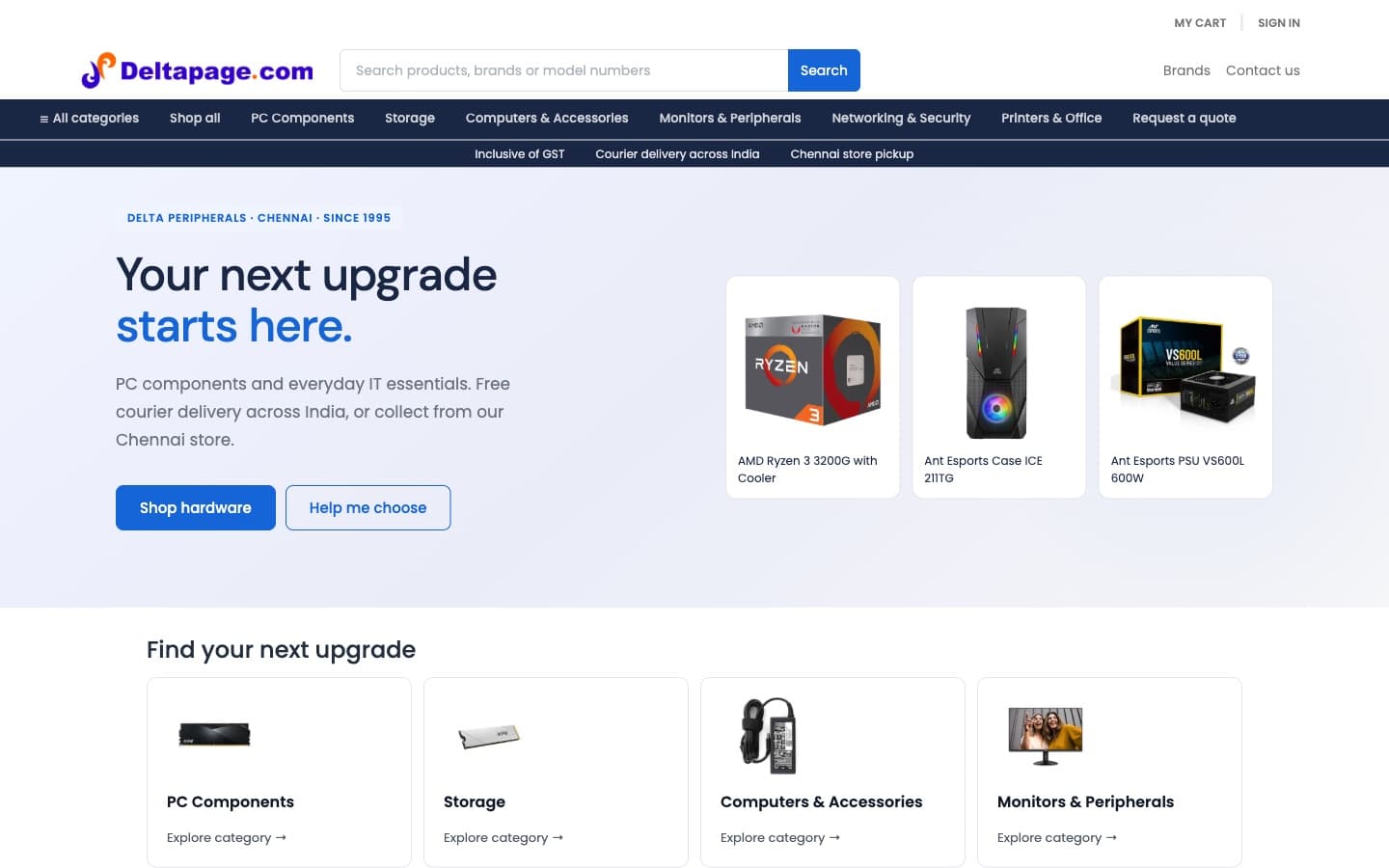

The harder problems were underneath. Product information arrived on supplier spreadsheets with inconsistent barcodes and model names. Specifications were patchy, so filters could not do much. And the website's pricing rules were quietly adding a markup on top of prices that were already final.
A shop that helps you find the right part
People buying hardware know what they want in technical terms: socket, memory generation, capacity, wattage. The storefront's job is to let them say that quickly and then get out of the way. We built a custom layer over the existing theme, so Delta did not have to start over, covering the homepage, navigation, category pages, product cards, product pages and footer.
- Browsing by department, with image-led department tiles, a prominent search bar with autocomplete, and the same category navigation everywhere in the shop.
- Filters that fit the category. Processors filter differently from printers. Selected filters show as removable chips, long option lists are searchable, and on a phone the filters slide out from a drawer.
- Counts you can trust. Category counts only include published products, and a product listed in two categories is not counted twice.
- Honest stock and buying controls. Availability comes from Delta's warehouses, products with variants ask you to pick one before adding to cart, and GST is stated plainly.
- One WhatsApp button that knows which product you were looking at, so the enquiry arrives with the product attached.
- Comparison and quote requests for customers weighing up several options.
Before handover, the buying flow passed 34 automated checks and navigation and filters passed 41, with no JavaScript errors. We checked desktop and mobile pages again on the live site after the move to production.
From supplier spreadsheets to product pages
Suppliers send product lists as spreadsheets, and no two look alike. Barcodes are missing or wrong, model names vary, the same product appears twice, and links point at the wrong page. Copying that into Odoo by hand is slow, and copying it in by script without care is how a shop ends up with the wrong specs on a product page.
We built a reusable pipeline that matches each supplier row to the right Odoo product, pulls the product's page from the supplier's website, and writes a clean description, a specification table, the filter attributes and an image gallery back into Odoo. A few things it does that matter:
- It refuses look-alike matches. Two memory kits can share most of a model number and differ in DDR generation. The pipeline checks for hard differences like that before accepting a match.
- It asks a person when it is unsure. Uncertain matches go into a review file instead of straight into the catalogue.
- It handles messy sources. Different spreadsheet layouts, missing dealer costs, and several supplier page designs are all handled.
- It caught bad supplier links that would otherwise have grouped different products together as variants of one.
For MSI, the first supplier through it, the pipeline pulled 239 of 239 product pages with descriptions and specification tables intact. A later check of 303 MSI products found no missing specifications and no conflicting values.
Two thousand products, one category at a time
Specs only help shoppers if they are right, named consistently, and attached to the right product. So we went through the rest of Delta's catalogue one category at a time: components, peripherals, storage, networking, printers, accessories and more. For each category we decided which specifications mattered, which sources to trust, and how to treat each brand, then recorded the evidence behind every product decision.
The result covers 2,123 products across 40 categories. 934 were fully enriched, 392 partly, and 797 were deliberately held back. Together with the 251 MSI products already done, Delta now has 1,185 fully enriched active products. In the final session alone we saved 11,877 specification values, filled in 129 missing main product images and added 395 gallery images.
The clean-up also produced the map the new filters run on: 162 verified pairings of a category with a specification worth filtering by. Every one uses an attribute Delta already had, tidied and standardised, rather than a pile of new ones. Existing variants and how they are selected were left exactly as they were.
When the website disagrees with the price tag
Delta's staff set a Sales Price on every product, and that price is final. But some old website pricelist rules were still applying a cost-based markup on top, so the website could show more than the price Delta meant to charge. One product with a Sales Price of ₹1,800 was showing at ₹2,325.
We traced the problem to 13 category-level rules across two website pricelists and changed them to use the Sales Price as it is, with no extra markup, surcharge or rounding. Currency conversion and tax handling were left alone. We tested the fix on a staging copy of the shop first: the ₹1,800 product showed ₹1,800, and none of the 613 published products' own Sales Prices changed, because only the extra markup was removed. With the original rules backed up and product listings, product pages and a test cart checked, the fix went live on deltapage.com.
Moving it all onto the live shop
Deploying a website's code does not move its content.
New templates and styles can ship in minutes. The descriptions, images, specifications, category memberships, saved page layouts and website settings live in the database, and the live database is not a copy of the development one. Its record numbers differ, and every day it gains new orders, invoices and stock movements that must not be disturbed.
So the move was treated as its own project:
- Snapshots first. Scoped backups of the catalogue, website settings and images, each with checksums.
- Match by identity, not by number. Every change was keyed to a verified product identity instead of assuming record numbers lined up between databases.
- Rehearse, then repeat. Catalogue, image, navigation, display and language changes were run on a development copy before production.
- Check before every write. Each change confirmed the current value was what we expected before replacing it, and protected data (stock, prices, costs, orders, invoices, variants and history) was checked before and after.
- Keep an undo record. Every change was journalled, and rolling back was rehearsed before it might be needed.
- Go in small steps. The release was split into batches sized to the server's time, storage and memory limits, each with a receipt.
The release came to 8,566 catalogue changes and 35 website changes, committed in 22 verified batches. Afterwards we checked 12 live pages and six interactions on desktop and mobile, including department navigation, mobile filters and sampled product specs and images. The recovery archives were independently verified before the release files were cleaned up.
Connecting Odoo to WhatsApp
Delta was the first business to run CalanaiConnect, our AI system for WhatsApp customer support. For it to answer "where's my order?" or send an invoice, it needs to hear from Odoo, so we built the Odoo side of that connection:
- Invoices on request. CalanaiConnect can fetch the PDF of a posted customer invoice using Odoo's existing API key, so a customer can ask for their invoice on WhatsApp.
- Order, invoice and delivery updates. When an order changes, an invoice is posted, or a delivery moves, Odoo notifies CalanaiConnect.
- Signed and sent safely. Each notification is signed so CalanaiConnect knows it really came from Delta's Odoo, and it only goes out after the change is saved, in the background, so the shop never waits on WhatsApp.
- Quiet during bulk work. Notifications are suppressed during imports and module installs, so a catalogue update cannot message every customer.
If you sell online and WhatsApp is where your customers ask questions, our guide to WhatsApp automation for e-commerce and retail walks through what this looks like day to day.
Smaller tools we built along the way
Not everything was customer-facing. A few tools came out of watching how Delta's team actually works:
- Purchase receipts and vendor bills. An extension so that confirming a purchase order completes the goods receipt and creates and posts the vendor bill, with dates following the order. If either step fails, the reason is written on the purchase order for staff to see.
- Reviewing slow stock. A last-movement date on every product, with filters for no movement in three, six or twelve months. Staff can select slow products and archive and unpublish them from the website in one action.
- A barcode screen. A stripped-down product screen, and a staff role to go with it, for the one repetitive job of updating barcodes without wading through the full product form.
- Keeping the custom shop reliable. Fixes for product-page headers, startup warnings, image processing and backend assets, each with regression tests (10 for the header fix, 13 for the startup warnings).
What we haven't measured
We have not published sales, conversion or time-saved figures here, because we do not have clean before-and-after measurements for them yet. Every number in this post is one we can verify from the work itself. If Delta shares business results later, we will add them.
If your business runs on Odoo, or is about to
Most of what made this work is not specific to Delta. Fix the data before the design, because a beautiful filter on bad specs is still a bad filter. Let a person decide when the data is unclear. And treat moving to the live system as its own project, with checks and an undo plan, not as the last ten minutes of the job.
If your shop, ERP or catalogue has grown messy in the same ways, we would be glad to look at it with you.
Written by
Mayur Sethia
Co-founder, Strategy & Operations
Works with Indian business owners daily on operations, growth, and the systems behind both.
Wondering what better technology looks like for your business?
Book a free 30-minute call and we'll show you where to start.